
Automated trading8 min read
Forex VPS for EAs: do you need one, and how to set it up
A forex VPS keeps your Expert Advisor running when your own computer is off. When you need one, how much power it needs and how to set it up.
A forex VPS for EA trading is a remote computer that runs your MetaTrader terminal around the clock, so your Expert Advisor can keep working when your home computer is switched off or asleep. You need one if your EA is meant to trade outside the hours you sit at your desk, because an EA only runs while its terminal is open, connected and logged in.
Do you need a forex VPS for EA trading?
The answer depends on when your EA needs to act. A scalping EA, a news EA or a gold EA trading through the London and New York sessions cannot wait for you to open a laptop. A VPS gives it steady power and internet that do not depend on your home broadband, a Windows update or someone closing a laptop lid.
You may not need a VPS yet if you are testing on demo for a few hours at a time, or if your EA only trades at a daily close and you are reliably at your desk then. Before you pay, check whether your EA truly needs to run continuously, and read what an Expert Advisor is if you are still deciding how an EA fits your trading. A VPS does not improve a weak strategy. It changes only where and how reliably the terminal runs, not your entries, stop loss or risk per trade.
Why your EA needs the terminal running
An Expert Advisor runs inside MetaTrader 4 or MT5, not on your broker's server. When the terminal is closed, the computer sleeps or the internet drops, the EA stops checking prices, managing open trades and placing new orders. Pending orders and stop losses already sent to the broker still exist, because the broker holds those, but trailing stops managed by the EA, time-based exits and new signals do not work until the terminal returns.
This matters most for EAs that manage trades actively. If an EA should move a stop to breakeven after price moves 20 pips, and your computer sleeps at that moment, the stop stays where it was. A VPS hosts the terminal on a server in a data centre. You connect to check it, then disconnect, and the terminal keeps running. Disconnecting your view does not switch the VPS off, a point that confuses many first-time users.
Home PC versus VPS, latency and location
Running an EA on a home PC
A home PC works when you are present and the machine stays awake and connected. The problems are practical: Windows updates can restart it overnight, a power cut ends the session, Wi-Fi can drop and a laptop on battery saver may sleep. Any one of these can leave an EA offline during a session you planned to trade, such as the London and New York overlap described in our guide to the forex trading sessions. A home PC is still sensible for learning and for short, supervised demo tests.
VPS location and latency
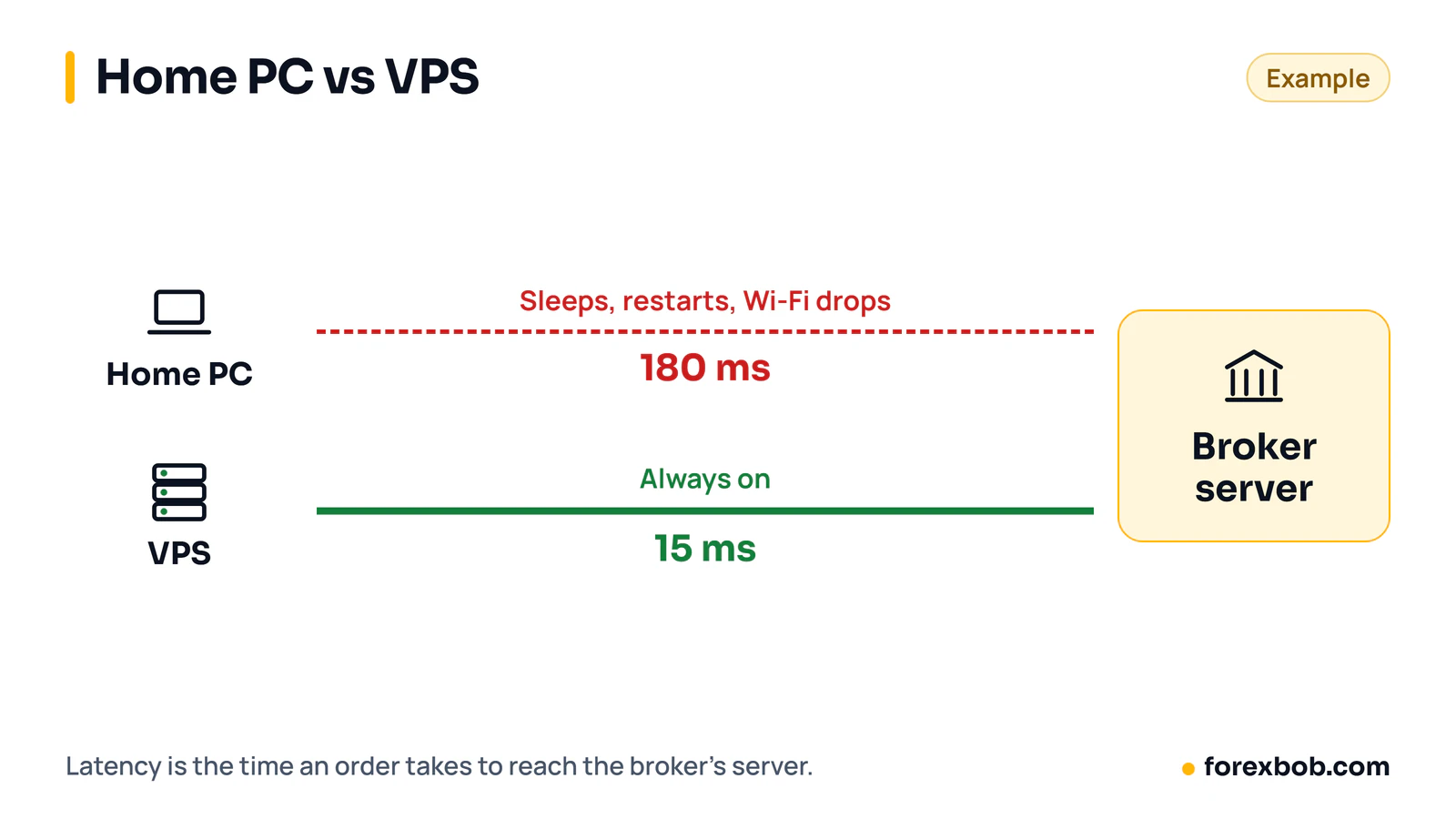
Latency is the time a message takes to travel between your terminal and your broker's trade server, measured in milliseconds. Lower latency means your order reaches the server sooner, which matters most for short-term strategies where a delay can change the fill price. A VPS near your broker's server usually gives lower latency than a home connection on another continent.
A simple example: suppose your home connection gives 180 milliseconds of latency, and a VPS in the same region as the broker gives 15 milliseconds. The difference is 180 − 15 = 165 milliseconds, or 0.165 seconds. The effect on any single trade is uncertain, because price may move for or against you during the delay, so treat lower latency as less delay, not as a source of profit. MT5 shows your latency in the connection status at the bottom right of the terminal. Check the current price on the provider's site before choosing a plan.
How much RAM and CPU does MT5 need?
Most traders overbuy VPS power at first. One MT5 terminal running one or two EAs on a handful of charts usually runs well on 2 GB of RAM and a single modern virtual CPU core, if nothing else heavy runs on the server. Problems start with many terminals, many charts with heavy indicators or several EAs at once. Start small, watch the server's task manager for a week, and upgrade only if memory use stays above about 80% or the terminal feels slow. Keep the VPS for trading only.
How to set up a VPS step by step
There are two common routes. With a standard Windows VPS, you rent a server and install the terminal yourself. With MetaQuotes virtual hosting, the hosting service built into MT4 and MT5, you rent from inside the terminal and it copies your EAs and settings to the hosted terminal. Both end with the same result: a terminal that keeps running without your home computer.
- Choose a server location near your broker's trade server, and a plan sized for your number of terminals.
- Confirm your broker account, and note whether it is live or demo, so the two are never mixed up.
- For a standard VPS, connect with Remote Desktop, install the terminal and log in with your account number and password.
- For MetaQuotes virtual hosting, right-click your account in the Navigator window, choose the virtual hosting option and follow the on-screen steps.
- Attach your EA to the correct chart and symbol, enable auto trading and confirm the EA shows as active.
- Test on demo first, or watch the first live session closely, and confirm activity in the Experts tab.
- Disconnect Remote Desktop without logging off or shutting down, so the terminal keeps running.
Keeping the terminal logged in
On a standard VPS, never click log off or shut down when you finish checking the terminal, because logging off can close the terminal and stop your EAs. Close the Remote Desktop window instead, which disconnects your view while the server session continues. If you change your broker password, update it on the VPS terminal too, or the terminal will sit disconnected and your EA will do nothing.
Checking the Experts and Journal logs
Two tabs at the bottom of MT5 tell you most of what you need. The Experts tab shows messages from your EA, such as orders placed and errors reported. The Journal tab shows terminal events, such as logins and disconnections. Check both at least once a day for a live EA. Repeated disconnections suggest a network problem, errors such as trade disabled suggest a setting problem, and long silence from an EA that should trade often suggests it is not attached or auto trading is off.
Our EA development service tests every EA in the Strategy Tester and on demo before delivery, which reduces, but does not remove, the need for these live checks.
Weekends, broker server time and maintenance
The market is closed over the weekend, but your VPS keeps running, which creates two small jobs. Your broker may restart its servers over the weekend, so check the Journal on Sunday evening or Monday morning and confirm the terminal reconnected and the EA is active. Broker server time also differs from your local time, and EAs with time filters must use server time. A one-hour daylight saving shift can move a session filter into a different part of the day, so write down the server time offset and check it after each clock change.
Common mistakes
- Logging off or shutting down the VPS instead of disconnecting, which closes the terminal and stops the EA.
- Running the same EA on the VPS and on a home computer, which can place duplicate trades.
- Choosing a VPS far from the broker's server, then blaming the EA for slow fills.
- Overloading a small VPS with many terminals, heavy indicators and a browser.
- Forgetting to update the broker password on the VPS after changing it.
- Ignoring the Experts and Journal logs until an error has run for days.
- Setting time filters in local time instead of broker server time.
- Assuming a VPS fixes a losing strategy or a position size that is too large.
FAQ
Do I need a VPS to run an Expert Advisor?
You need a VPS if your EA must trade while your home computer is off, asleep or disconnected. An EA only runs while its terminal is open and logged in, so a computer that sleeps cannot run an EA reliably. For short supervised tests, a home computer is fine.
What is MetaQuotes virtual hosting?
MetaQuotes virtual hosting is a service built into MT4 and MT5 that rents you a virtual server and copies your terminal setup, EAs and indicators to it. It suits traders who want a managed setup without configuring a Windows server. Check the current price on the MetaQuotes site, because it can change.
How much does a forex VPS speed up my EA?
A VPS near your broker's server usually lowers latency, so orders reach the server sooner. The benefit depends on your starting latency, your strategy and market conditions at each order. Lower latency reduces delay, but it does not turn a losing strategy into a winning one.
Can I run more than one EA on a single VPS?
Yes, if the VPS has enough memory and processing power for each terminal and chart. One terminal can run several EAs on different charts, but many traders run one terminal per account or strategy to keep logs separate. Watch memory use after adding each EA, and upgrade if it stays high.
What should I check on my VPS each week?
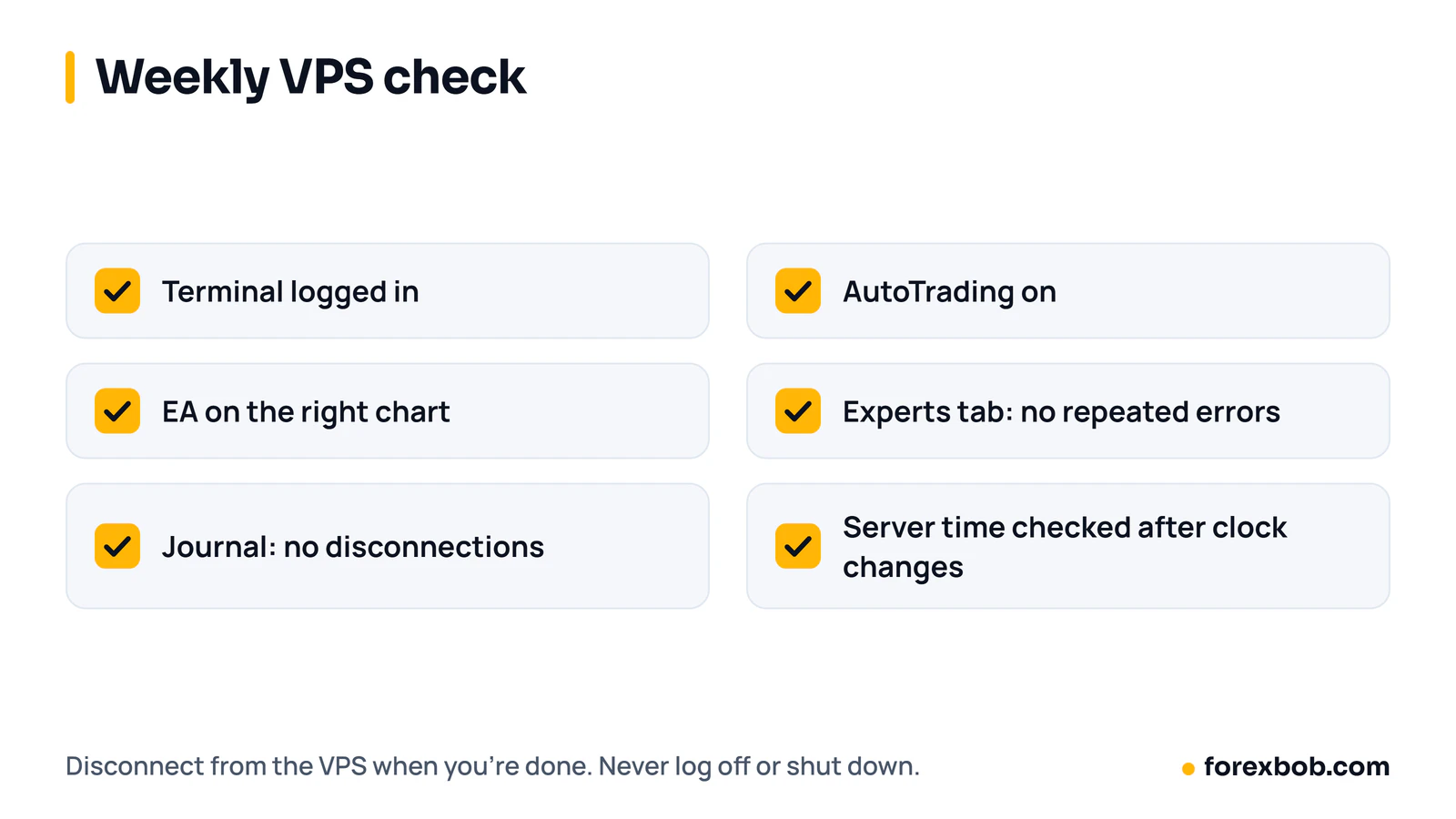
Check that the terminal is logged in, auto trading is enabled, each EA is on the correct chart, and the Experts and Journal tabs show normal activity without repeated errors. Also confirm the broker's server time, especially after daylight saving changes, if any EA uses time filters.
A VPS is a practical tool, not a trading edge. If your EA needs to run while you are away from your desk, choose a server near your broker and check the logs often. Before you leave an EA running unattended, test it with the steps in how to backtest a trading idea. For help turning a manual strategy into an EA, see our EA development page.
Keep reading: what an Expert Advisor is, the four forex trading sessions and custom EA development.
Risk note: trading forex carries a high level of risk and may not be suitable for everyone. This article is for education only and is not financial advice.
Have a strategy you want automated?
We turn trading rules into tested Expert Advisors for MT4 and MT5. Tell us how you trade and we'll send a specification and a quote.
More articles
Automated trading8 min read
What is an Expert Advisor (EA) and how does it work?
An Expert Advisor is a program that trades for you in MetaTrader from rules you set. How it works, what it can and can't do, and how to judge one.
Read articleAutomated trading8 min read
How to turn your trading strategy into an EA
Turn a trading idea into exact EA rules, test it properly and hire a developer with confidence: the specification, the testing and the red flags.
Read articleAnalysis8 min read
Best backtesting and replay tools for forex traders (FX Replay, TradingView, MT5)
Manual replay and automated testing answer different questions. How FX Replay, TradingView and MT5 compare, so you can test an idea without fooling yourself.
Read article