
Automated trading8 min read
What is an Expert Advisor (EA) and how does it work?
An Expert Advisor is a program that trades for you in MetaTrader from rules you set. How it works, what it can and can't do, and how to judge one.
What is an expert advisor in forex? It is a program that runs inside MetaTrader and places trades from a set of rules, instead of you clicking buy or sell by hand. You decide the rules, the EA follows them every time those conditions appear, and it can keep watching the market while you are away from the screen.
That last point is the main appeal, and also the main source of confusion. An EA does not understand the market, guess what will happen next, or improve itself on its own. It reads price data, checks it against your rules, and acts only when the rules say to act. If the rules are weak, the EA will follow weak rules with great discipline.
What is an expert advisor in forex?
An expert advisor, often shortened to EA, is an automated trading program for MetaTrader 4 or MetaTrader 5. Traders also call it a trading robot, but that name can mislead: there is only code inside your trading terminal that can open, manage and close positions.
A typical EA has three parts. First, it gathers market data, such as the current price, recent candles and indicators built into the rules. Second, it checks that data against entry, exit and risk rules. Third, if the rules are met, it sends an order through MetaTrader, and it can later move a stop loss or close the trade when an exit rule triggers.
EAs are written in MetaQuotes Language: MQL4 for MT4 and MQL5 for MT5. Code for one does not run on the other without rewriting, as our MT4 vs MT5 comparison explains.
How an EA reads the market and places trades
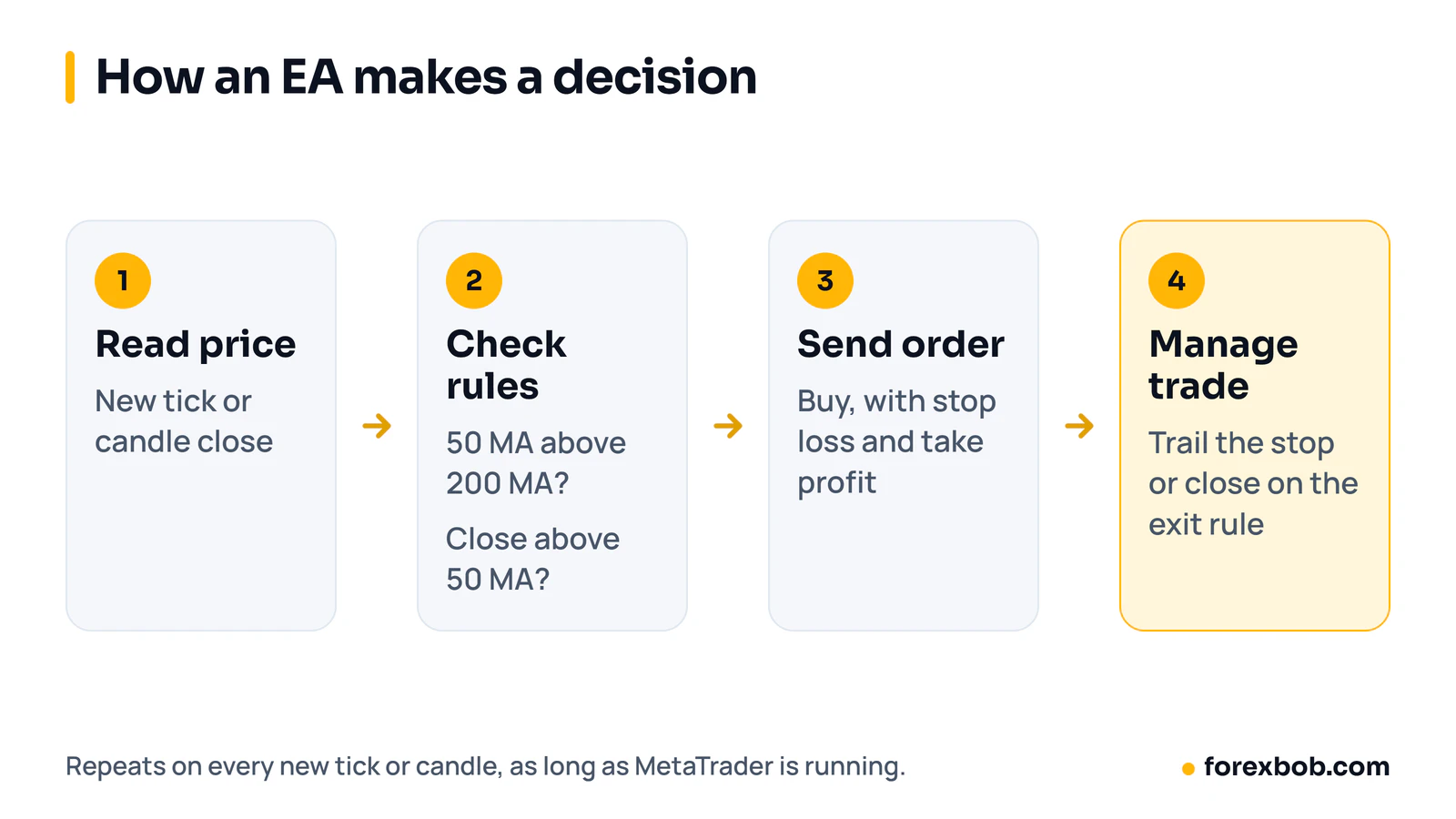
An EA does not watch a chart the way you do. It reads data on every new price tick, or only when a new candle closes, checking the latest bid and ask, recent candle prices and indicator values such as moving averages.
Consider a simple trend rule. The EA might check whether the 50-period moving average is above the 200-period average, and whether the last closed candle finished above the 50-period average. If both are true and no position is open, it sends a buy order, and it closes when the stop loss or an exit rule triggers. Every step is a yes or no test.
A well-built EA sets a stop loss and take profit at entry, so a trade cannot run without a defined exit. It should handle a rejected order or a lost connection without resending the same order repeatedly, and it should respect your broker's minimum stop distance and lot step.
A worked example of position size in an EA
Suppose you have a $10,000 account and you risk 1% on each trade. That gives a risk amount of $100, because $10,000 × 0.01 = $100.
Now suppose the EA trades EUR/USD with a stop loss 50 pips from the entry price. For a standard lot of EUR/USD, one pip is worth about $10, so the EA must risk $2 per pip to stay within the limit: $100 ÷ 50 pips = $2 per pip. A position of 0.20 lots gives $2 per pip, because 0.20 × $10 = $2. If the stop loss is hit, the loss is 50 pips × $2 = $100.
Our position size calculator follows the same steps, and lot sizes explained shows how lot size changes pip value.
What an EA can and cannot do
An EA can watch many pairs at once without getting tired, and it can follow a rule exactly, even after a losing trade, when a human trader might hesitate. It can trade while you are asleep, provided the terminal stays running, and it keeps a consistent trade record for later review.
An EA cannot read news headlines and judge a central bank statement, and it cannot tell that a market has changed character unless you built a specific rule for that change. It cannot make losses back by trading larger sizes, and any EA that increases size after a loss carries extra risk. Automation makes a strategy faster and more consistent, but it does not make losing rules profitable.
EA vs indicator vs script
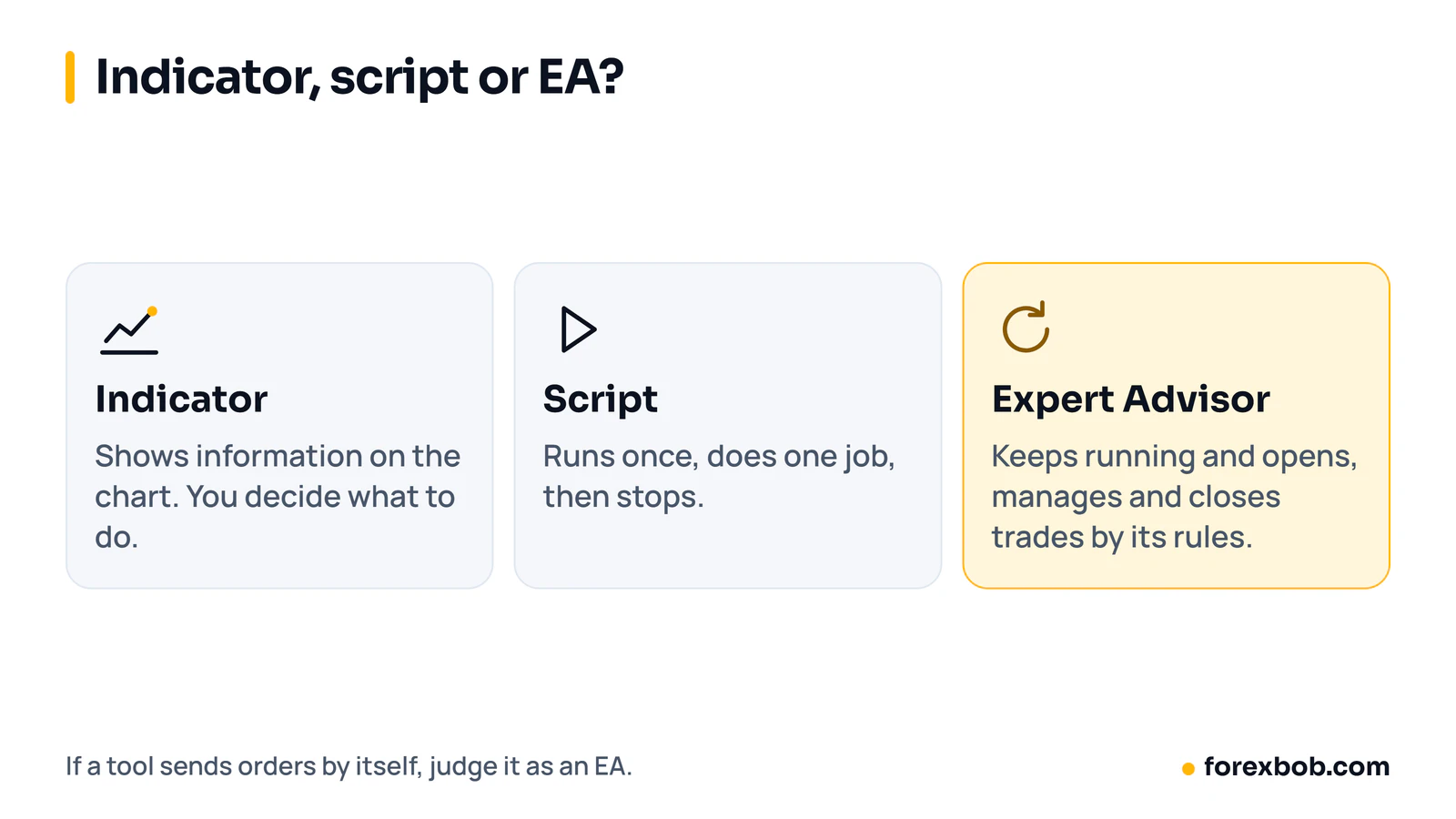
These three MetaTrader tools are often confused, but they do different jobs. An indicator draws information on a chart, such as moving averages or an oscillator, but it does not place trades on its own. You read it and decide what to do.
A script runs once and then stops. A trader might use a script to close all open trades, or to place a set of pending orders at set levels. Once it has done that single job, it ends, and it does not keep watching the market.
An EA keeps running and keeps checking its rules. It can place, manage and close trades without you clicking each time. That ongoing action is the key difference. If a tool only shows information, it is an indicator. If it runs once, it is a script. If it keeps making trading decisions from rules, it is an EA. If a product combines an indicator display with EA functions, judge it as an EA, because it sends orders by itself.
Where an EA runs: your computer or a VPS
An EA runs inside the MetaTrader terminal on the machine where that terminal is open. On a home computer, that means the computer must stay on, MetaTrader must stay open and the internet connection must stay stable.
A forex VPS is a remote computer that stays online around the clock. You install MetaTrader on the VPS, attach the EA, and then you can close your own laptop without stopping the EA. This helps with power cuts, restarts and connection drops at home, and it often gives a faster, more stable connection to a broker server. It does not remove trading risk, and it does not make an EA better. It only keeps it running. Our guide to a forex VPS for EAs covers the setup.
A VPS still needs checks. Make sure the terminal stays connected, the EA stays enabled and auto-trading stays on after any restart or update.
How to judge an EA before you trust it
Do not trust an EA from a screenshot or a sales page alone. Start with the rules: can the developer explain, in plain words, when it enters, when it exits, how it sets stops and how it sizes positions? If the rules are secret or vague, you cannot test whether they suit your account and risk tolerance.
Next, look at testing. A backtest shows how the EA would have performed on past data, but check whether it used a long period, different market conditions, and realistic spreads and commissions. A test on a few months of calm trending data tells you little about a sharp reversal. Forward testing on demo is the next step, because it shows live-price behaviour, including slippage and connection issues.
Risk checks matter as much as entry rules. Look at the largest drawdown, the longest losing run and the average loss compared with the average win, and ask what happens if several trades are open at once. Our guide on how to judge an Expert Advisor walks through these checks. Start on demo, then with a small live size if you go ahead.
Common mistakes
- Running an EA on a laptop that sleeps, so trades are missed.
- Using full size before any demo testing, because a backtest looked smooth.
- Changing settings after every losing trade, so the original rules are never tested.
- Running several EAs on the same pair without checking for overlapping trades and doubled risk.
- Ignoring spread and commission in testing, then being surprised by live results.
- Assuming an EA will adapt to news or a broken feed without a rule for it.
- Not checking that the EA restarted correctly after platform updates.
FAQ
Does an EA trade while my computer is off?
No, not if MetaTrader runs only on that computer. The EA stops when the terminal closes or the computer sleeps. To keep it running, traders use a VPS with MetaTrader installed, and they still check it stays connected after restarts.
Can an EA lose money?
Yes. An EA follows rules, and rules can produce losing trades, losing runs and drawdowns. A larger position size increases both gains and losses, so risk settings and stop losses matter more than the entry signal alone.
Do I need coding skills to use an EA?
No, you do not need to code to run a ready-made EA. You do need to understand its settings, such as risk per trade and trading hours, and how to attach it to a chart and enable auto-trading.
Is an EA the same as a signal service?
No. An EA is software that trades your own account from set rules, while a signal service sends trade ideas that you may choose to follow. ForexBob builds custom EAs and sells its own AETHON EAs; it does not sell signals, copy trading or account management.
How long should I test an EA before using it live?
Test it on past data first, then on a demo account long enough to cover trending and ranging periods. Treat demo results as a check for errors and behaviour, not as a promise about future results.
If you already trade a manual strategy, coding it as an EA can help you test it more consistently without watching charts all day. Our custom EA development service starts with a written specification of your rules, then codes, tests and delivers the EA for MetaTrader 4 or 5. You can also browse our own Expert Advisors to see how a finished EA is described.
Keep reading: how to judge an Expert Advisor, MT4 vs MT5 and forex VPS for EAs.
Risk note: trading forex carries a high level of risk and may not be suitable for everyone. This article is for education only and is not financial advice.
Have a strategy you want automated?
We turn trading rules into tested Expert Advisors for MT4 and MT5. Tell us how you trade and we'll send a specification and a quote.
More articles
Automated trading8 min read
How to turn your trading strategy into an EA
Turn a trading idea into exact EA rules, test it properly and hire a developer with confidence: the specification, the testing and the red flags.
Read articleAutomated trading8 min read
Forex VPS for EAs: do you need one, and how to set it up
A forex VPS keeps your Expert Advisor running when your own computer is off. When you need one, how much power it needs and how to set it up.
Read articleAnalysis8 min read
Best backtesting and replay tools for forex traders (FX Replay, TradingView, MT5)
Manual replay and automated testing answer different questions. How FX Replay, TradingView and MT5 compare, so you can test an idea without fooling yourself.
Read article