
Automated trading7 min read
MT4 vs MT5: which MetaTrader should you use?
MT4 and MT5 look similar, but they differ on hedging, timeframes, order types and backtesting. A comparison to help you pick the platform that fits how you trade.

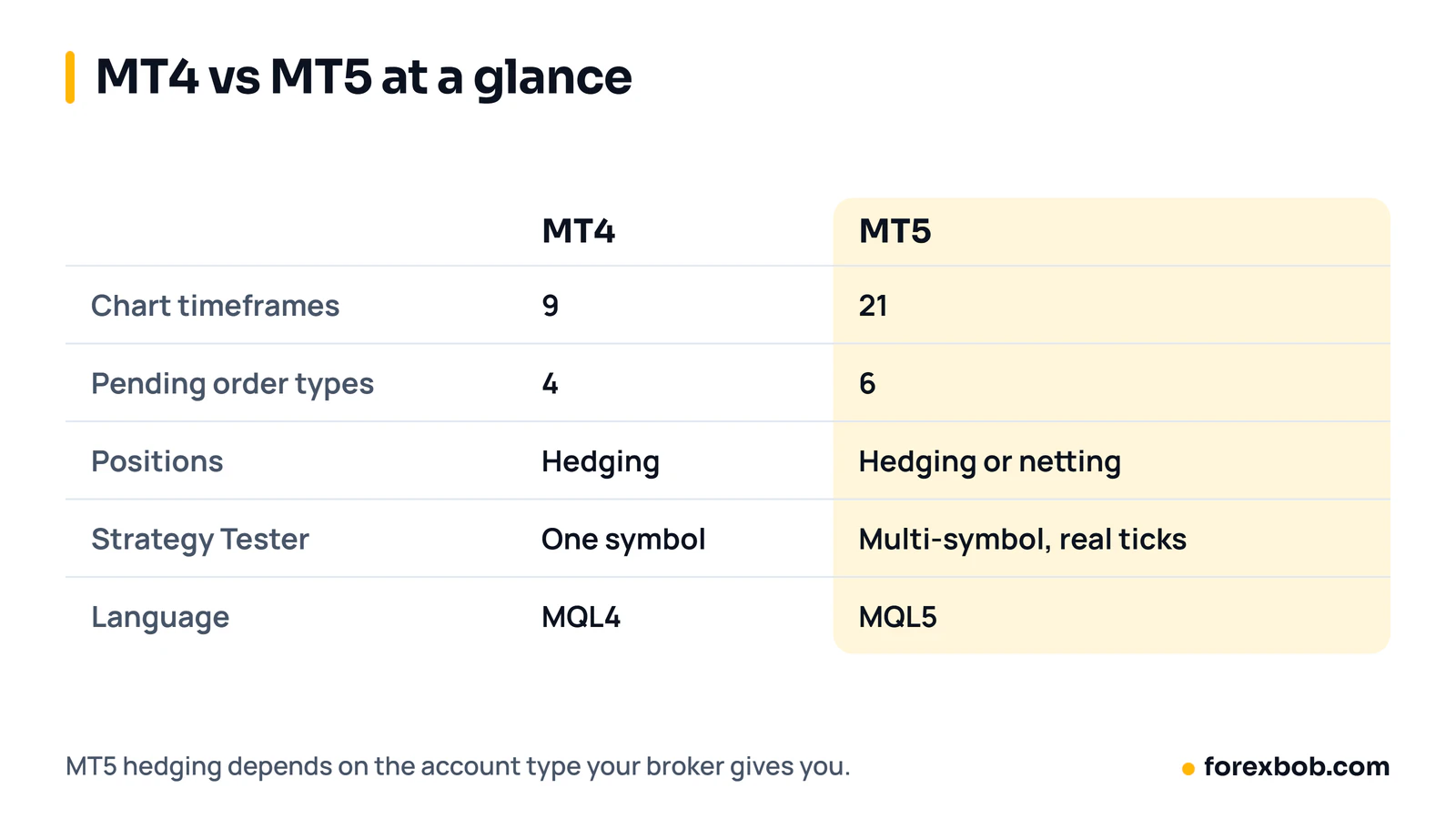
MT4 vs MT5 is a choice most new MetaTrader users face, and the short answer is that MT5 is the newer platform with more tools, while MT4 remains a simpler option that many brokers and traders still use. If you trade manually with basic orders, either platform can work. If you want advanced backtesting, more timeframes or a modern EA, MT5 usually has the edge.
The difference is not only about age. MT4 and MT5 are separate platforms with different account types, order handling and programming languages. An indicator or EA built for one will not run on the other without being rewritten. Before you pick, it helps to understand the differences that actually change how you trade day to day.
MT4 vs MT5 at a glance
MT4 was released in 2005 and became the standard platform for retail forex trading, known for a simple layout, fast charts and a very large library of indicators and EAs. MT5 followed in 2010 as a multi-asset platform. It supports forex, stocks and futures, depending on your broker, and it adds tools MT4 does not have.
For a beginner, the screens look familiar on both platforms: charts, a market watch list, a navigator panel and a terminal window for trades and history. The real differences appear when you place complex orders, test a strategy or run an EA.
Is MT4 still supported? MT4 still runs, and many brokers still offer MT4 accounts. At the same time, MetaQuotes focuses new development on MT5, which is a practical reason to lean towards MT5 if you are starting fresh and plan to use EAs for years.
Hedging vs netting
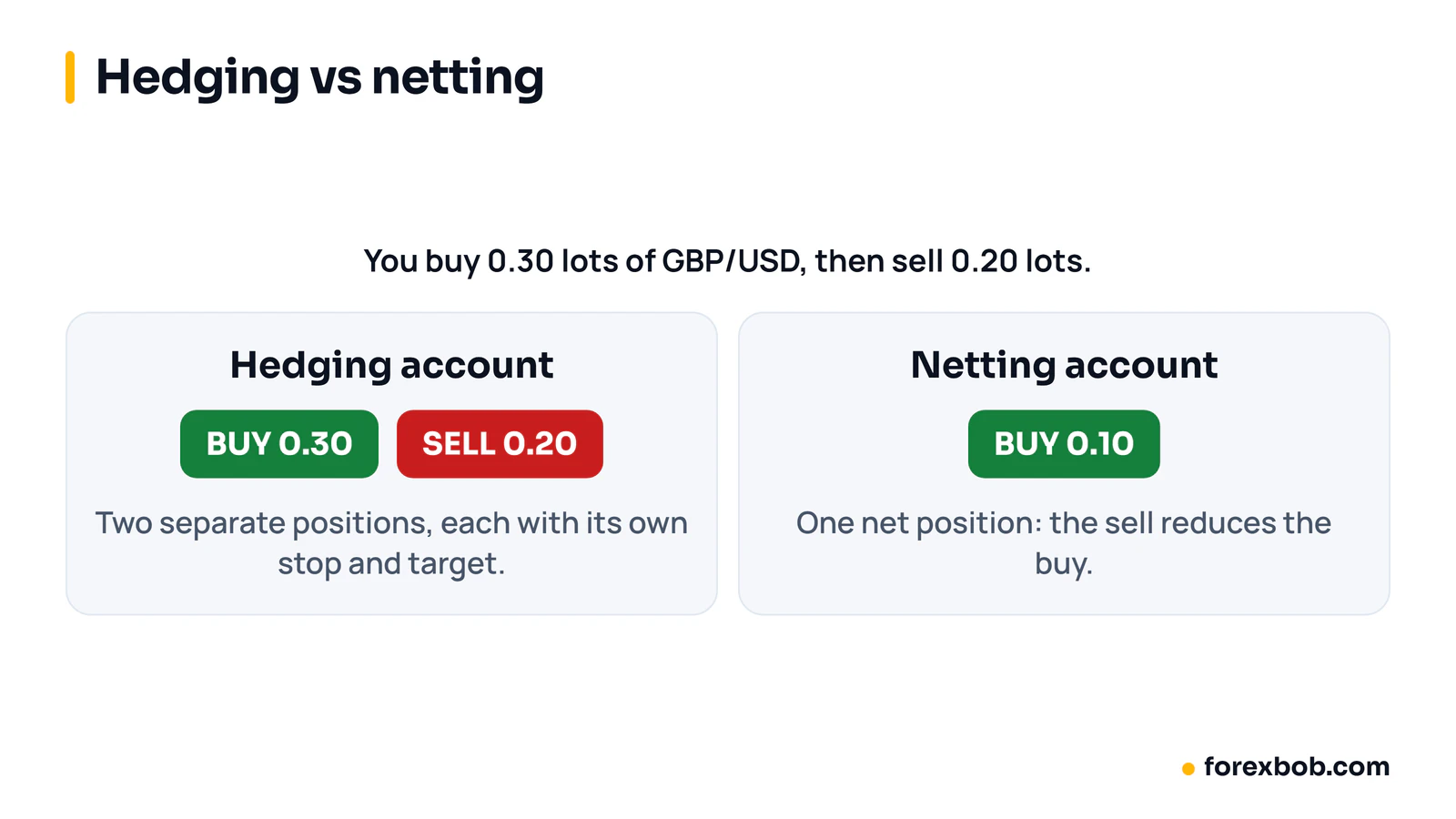
Hedging and netting describe how a platform handles two opposite positions on the same pair. On a hedging account, you can hold a buy and a sell on EUR/USD at the same time, each with its own entry price, stop loss and take profit.
On a netting account, opposite positions combine into a single net position. If you buy 0.30 lots of GBP/USD and then sell 0.20 lots, the result is a single buy of 0.10 lots. Netting is common on MT5 accounts for stocks and futures, and on some MT5 forex accounts.
MT4 only uses hedging, so the question never arises there. MT5 supports both systems, but the system depends on the account type your broker sets up, so check whether an MT5 account is hedging or netting before you trade.
Timeframes, order types and depth of market
MT4 offers 9 chart timeframes, from one minute to monthly. MT5 offers 21, including 2-minute, 3-minute, 6-hour and 12-hour charts, which helps if your strategy uses an interval MT4 does not offer.
Order types also differ. MT4 has market orders and four pending types: buy limit, sell limit, buy stop and sell stop. MT5 keeps those and adds buy stop limit and sell stop limit. A stop limit places a limit order when your stop level is reached, rather than a market order, so it gives more control but may not fill if price jumps past the limit. For placing stops, see where to place a stop loss.
MT5 also has a full depth of market window, which shows buy and sell orders at different price levels when your broker provides that data. MT4's version is more limited. Depth of market matters more for stocks, futures and exchange-style feeds than for simple market orders on spot forex.
Strategy Tester and backtesting
Backtesting is where MT5 pulls clearly ahead. The MT4 Strategy Tester tests one symbol at a time, and it builds price ticks from candle data unless you import higher-quality tick data. That can hide problems such as spread widening.
The MT5 Strategy Tester can test several symbols at once, which matters if your EA trades more than one pair, and it can use real tick data and multiple processor cores for faster tests. Our guide on how to backtest a trading idea explains how to set up a test and why a backtest alone is not proof of future results.
Backtesting quality still depends on the data. No backtest can include every future event, such as a news spike, a feed error or a spread change in thin markets, so forward testing on demo remains a useful second step on either platform.
A worked example of risk on either platform
Platform choice does not change position-size maths, and it helps to see that maths once. Suppose you have a $10,000 account and you risk 1% per trade. That is $100, because $10,000 × 0.01 = $100.
Suppose you trade EUR/USD with a stop loss 25 pips away. For a standard lot, one pip on EUR/USD is worth about $10. To risk $100 over 25 pips, you need to risk $4 per pip: $100 ÷ 25 = $4. A position of 0.40 lots gives $4 per pip, because 0.40 × $10 = $4. If the stop loss is hit, the loss is 25 × $4 = $100. MT4 and MT5 both let you set that stop and size, and our position size calculator and lot sizes guide use the same steps.
MQL4 vs MQL5: why old EAs need rewriting
MT4 EAs and indicators are written in MQL4, while MT5 uses MQL5. The languages share ideas such as variables and loops, but they handle orders, positions and events differently.
That means an MT4 EA cannot be copied into MT5 and expected to work. The file format, order functions and position reporting are different, especially on netting accounts, so a developer must rewrite the order handling and retest the logic. A simple indicator may port quickly, while a complex EA takes longer.
If you own an MT4 EA, ask the developer what a port to MT5 would involve before you move. If you are having a new EA built and are not tied to MT4, building it for MT5 from the start avoids a later rewrite. Our custom EA development service codes for both platforms, and the specification states which one the EA is for.
Broker availability and ongoing support
Broker availability often decides the question in practice. Not every broker offers both platforms, or the same symbols on each, and account terms can differ by platform, including hedging, minimum lot size and the markets offered.
Check four things before you open an account:
- Does the broker offer the platform you want, with the account type you need?
- Does it offer the pairs or markets you trade?
- What are the spreads and commissions on that account type? They affect both backtests and live costs.
- Does the platform support the tools you already use, such as the indicators or EAs you own?
If you chart outside MetaTrader, platform choice matters less for analysis. Our guide to TradingView alternatives covers other charting options if you want to separate analysis from execution.
Common mistakes
- Assuming an MT4 EA will run on MT5.
- Opening an MT5 netting account when your strategy needs opposite positions.
- Comparing backtests without matching data, spread and commission settings.
- Choosing a platform only for extra timeframes you never use.
- Switching without checking your broker offers the same symbols and terms.
- Assuming live trading will match a backtest exactly during news spikes.
- Forgetting that MT5 hedging depends on the broker's account type.
FAQ
Is MT4 still supported?
MT4 still runs and many brokers still offer MT4 accounts, so it remains usable. MetaQuotes focuses new development on MT5, which is why new traders who have a free choice often start on MT5. If your broker and tools are MT4-only, staying on MT4 is still a practical option.
Can I use the same EA on MT4 and MT5?
No, not without rewriting it. MT4 uses MQL4 and MT5 uses MQL5, and the two handle orders and positions differently. A developer must port the code and retest it on the target platform, even when the trading rules stay the same.
Is MT5 better for EAs?
For most new EA projects, yes, because MT5 offers multi-symbol backtesting, real tick data and faster multi-core testing. MT4 can still run EAs well, especially simple single-pair strategies. The best choice depends on your strategy, your broker and whether you already own MT4 code.
Does MT5 allow hedging?
MT5 can allow hedging, but only on a hedging account. Some MT5 accounts use netting instead, where opposite positions combine into one net position. Check your account type with your broker before you trade, and do not assume every MT5 account hedges.
Should a beginner choose MT4 or MT5?
A beginner who is starting fresh, with a broker that offers both, can start with MT5, since it is the newer platform with more timeframes and stronger backtesting. A beginner whose broker offers only MT4 will not be held back by it for basic manual trading.
If you are planning a new automated strategy, choose the platform first, then have the EA built for it. Our EA development process starts from a written specification, so the platform, hedging type and risk rules are agreed before any code is written.
Keep reading: how to backtest a trading idea, what an Expert Advisor is and TradingView alternatives.
Risk note: trading forex carries a high level of risk and may not be suitable for everyone. This article is for education only and is not financial advice.
Have a strategy you want automated?
We turn trading rules into tested Expert Advisors for MT4 and MT5. Tell us how you trade and we'll send a specification and a quote.
More articles
Automated trading8 min read
What is an Expert Advisor (EA) and how does it work?
An Expert Advisor is a program that trades for you in MetaTrader from rules you set. How it works, what it can and can't do, and how to judge one.
Read article
Automated trading8 min read
How to turn your trading strategy into an EA
Turn a trading idea into exact EA rules, test it properly and hire a developer with confidence: the specification, the testing and the red flags.
Read article
Automated trading8 min read
Forex VPS for EAs: do you need one, and how to set it up
A forex VPS keeps your Expert Advisor running when your own computer is off. When you need one, how much power it needs and how to set it up.
Read article