
MT5 Strategy Tester: a practical guide to backtesting EAs
Every setting in the MT5 Strategy Tester, which tick modelling to choose, how to read the report, and the traps that made our own tests look better than they were.

The Strategy Tester is built into MetaTrader 5. It runs an Expert Advisor over past prices as if they were live, and reports every trade it would have made. Used well, it tells you a lot about an EA before any money is on it. Used carelessly, it produces beautiful equity curves for strategies that lose.
This guide walks through the settings, the report, and the mistakes we have made ourselves so you can skip them.
Opening the tester
Press Ctrl+R, or go to View, Strategy Tester. The panel opens at the bottom of the terminal. Choose Single test to run one EA with fixed settings. The Settings tab is where everything starts.
The settings, one by one
- Expert: the EA to test. It must be compiled and sitting in your MQL5\Experts folder.
- Symbol and timeframe: the chart the EA runs on. EAs that read other timeframes internally will still load that data.
- Date: the test period. Use years, not weeks, and include at least one rough patch for the market you trade.
- Forward: holds back part of the period (a half, a third, a quarter or a custom date) as an out-of-sample test. Very useful with optimisation.
- Delays: adds execution delay. Zero latency is the default and is kinder than any real broker.
- Modelling: how prices inside each bar are simulated. This is the most important setting, so it gets its own section below.
- Deposit, currency and leverage: match your real account. Leverage changes margin, and margin can stop an EA opening trades.
- Optimisation: off for a single test. The genetic algorithm searches large sets of inputs quickly. The complete algorithm tries every combination.
The Inputs tab holds the EA's settings. Check it before every run. The tester remembers the last values you used for each EA, not the defaults in the code, so a value you changed last week can quietly carry into today's test.
Choosing the modelling mode
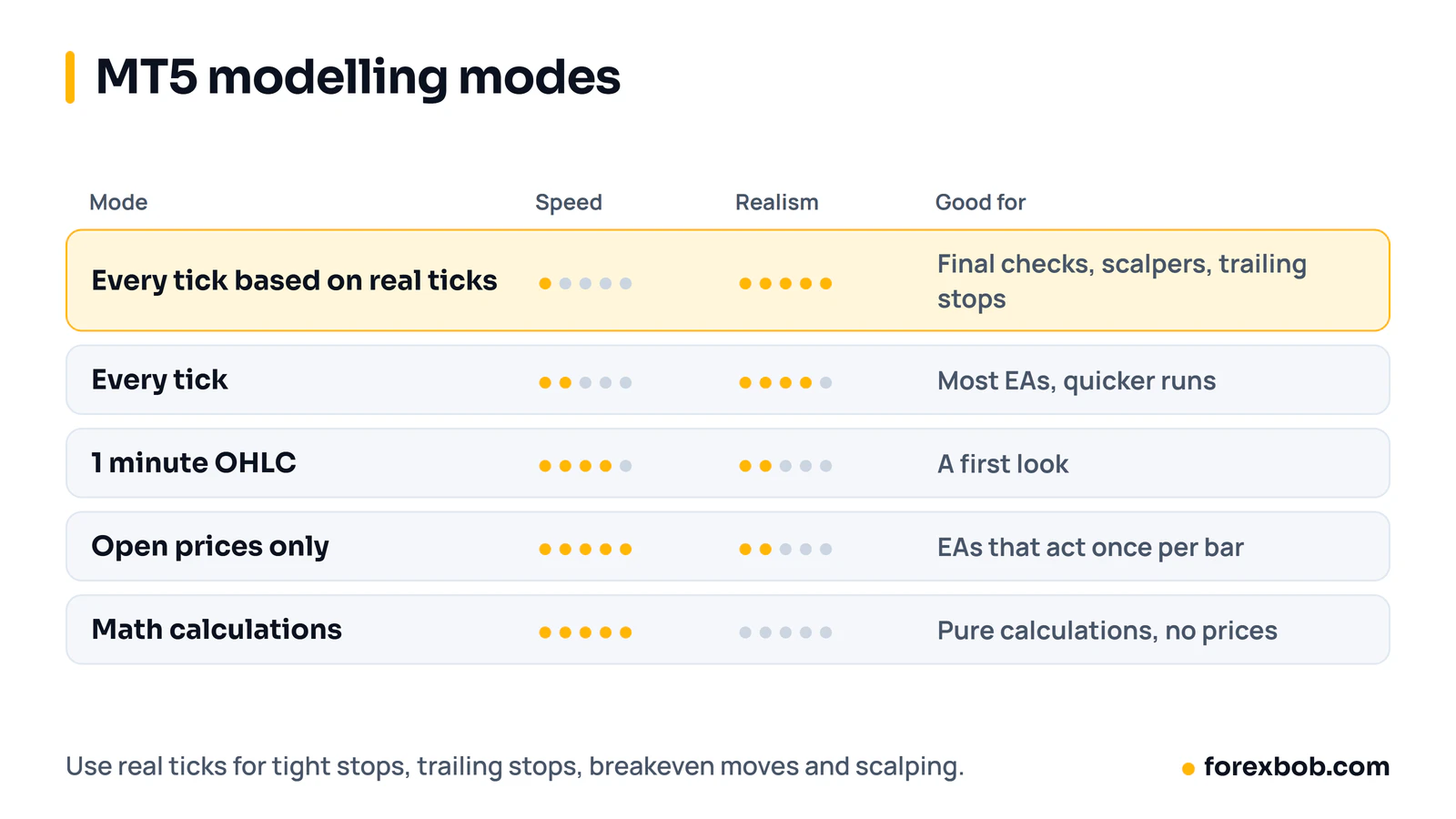
- Every tick based on real ticks: uses your broker's recorded tick history. The most realistic, and the slowest.
- Every tick: generates ticks from one-minute bars. Fast and decent, but the price path inside each minute is invented.
- 1 minute OHLC: uses only the open, high, low and close of each minute. Quick for a first look.
- Open prices only: fastest. Fine for EAs that only act at the open of a new bar and use bar-close values.
- Math calculations: no price data at all. For pure calculations.
Use real ticks for anything with a tight stop, a trailing stop, a breakeven move or scalping. Check the report's history quality figure too. Real tick history only goes back as far as your broker recorded it. When we checked, our broker's real tick history for gold and EUR/USD covered only about four months, and older years used generated ticks.
Reading the report
The Backtest tab shows the summary. The numbers to look at first:
- History quality: how much of the test used good data. Below 90% and the result is shaky.
- Total net profit and profit factor: profit factor is gross profit divided by gross loss. Below 1 loses money. Between 1 and 1.3 is thin once real costs appear.
- Expected payoff: average profit per trade. Compare it with your spread and commission. If one trade's cost is a big slice of it, the result won't survive live.
- Maximal drawdown, balance and equity: the equity figure includes open losses. For grid or martingale EAs it is the one that matters, because balance can look calm while open trades are deep underwater.
- Total trades: under 100 and the numbers can be luck.
Then open the Graph tab. A straight line that never dips is a warning, not a comfort. Real strategies have losing runs. See how to judge an Expert Advisor for what a believable curve looks like.
Traps that made our tests lie
These come from our own testing, and each one cost us time.
Trailing stops on bar data
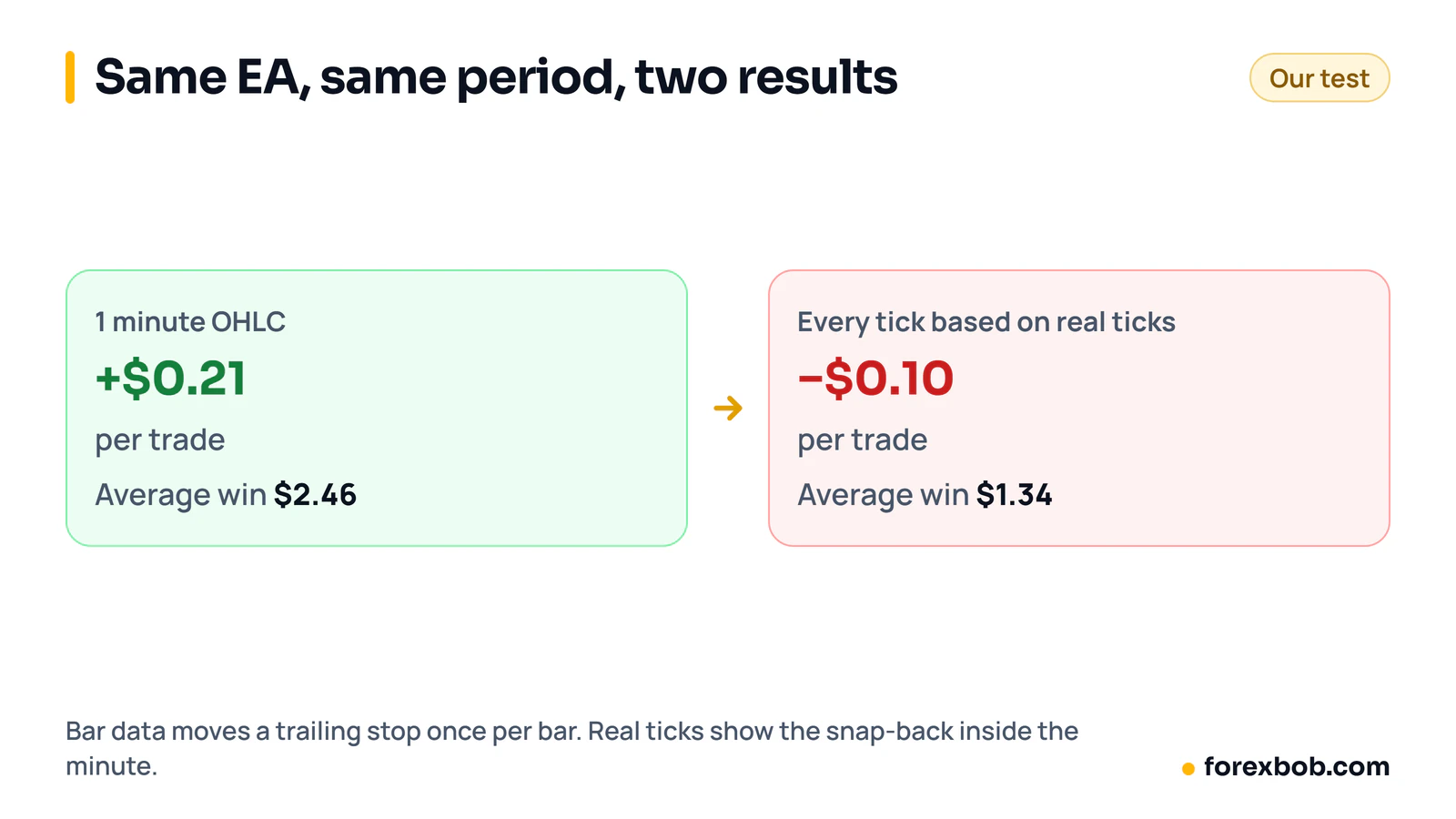
A gold scalper we tested looked profitable on 1 minute OHLC: about +$0.21 per trade. On real ticks, same EA, same period, it lost about $0.10 per trade, and the average win fell from $2.46 to $1.34. Bar modelling can only move a trailing stop once per bar, so it never sees price tighten the stop and snap back into it within the same minute.
Remembered inputs
The tester saves the last inputs you used per EA. We once spent hours chasing a result that came from an old setting, not from the code. Right-click in the Inputs tab and reset to defaults, or load a saved .set file, before an important run.
Cached history
When we replaced a custom symbol's price history, the tester kept using its own cached copy until we cleared it. If you edit data, clear the tester's cache for that symbol or the test runs on the old prices.
Where the EA's files go
If an EA writes log or CSV files during a test, they don't go to the terminal's normal MQL5\Files folder. Look in the tester agent's folder, something like Tester\Agent-127.0.0.1-3000\MQL5\Files inside your data folder (File, Open Data Folder). Some EAs write useful diagnostics there.
Visual mode
Tick Visual mode and the test plays on a chart you can watch, pause and speed up. It is the quickest way to check an EA does what you think on a few trades: entries in the right place, stops where they should be. It is far too slow for full tests.
Optimisation without fooling yourself
Optimisation runs the EA many times with different inputs and ranks the results. The best row is nearly always too good, because with enough combinations one of them will fit past noise.
- Set Forward to a third or a quarter, so the best settings are checked on data they never saw.
- Prefer a broad area of decent results over one sharp peak. If the inputs either side of the best row are much worse, the peak is luck.
- Keep the number of inputs you optimise small. Three is plenty.
Then test the chosen settings on real ticks with realistic delay before thinking about a demo account. If you would rather have someone else build and test the EA, see our EA development service.
Keep reading: how to backtest a trading idea, how to judge an Expert Advisor, backtesting and replay tools and algo trading with Python and MT5.
Risk note: trading forex carries a high level of risk and may not be suitable for everyone. This article is for education only and is not financial advice.
Have a strategy you want automated?
We turn trading rules into tested Expert Advisors for MT4 and MT5. Tell us how you trade and we'll send a specification and a quote.
More articles

Supply and demand trading: how to mark zones, and what testing shows
How to find supply and demand zones, draw them, enter and place stops. Then what happened when we tested a zone strategy on seven years of EUR/USD.
Read article
Forex risk management: the complete guide
Everything that decides how much you can lose, in one place: risk per trade, sizing, stops, leverage, correlated trades, drawdown limits and the extra risks of EAs.
Read article
Forex prop firms explained: funded accounts, the rules and using EAs
What prop trading is, how forex funded account challenges work, the drawdown rules that end most attempts, what firms allow with EAs, and the maths behind passing.
Read article