
Algo trading with Python and MetaTrader 5: a practical start
How to connect Python to MetaTrader 5, pull price history, check and send orders, and the gotchas we hit, plus when an MQL5 Expert Advisor is the better tool.
Python is the most popular language for trading research, and MetaTrader 5 has an official Python package that connects to the terminal. With it you can pull price history, read your account, and send real orders from a Python script.
We use it a lot for research. Here is how to get started, what the main functions do, the traps we ran into, and where an MQL5 Expert Advisor still does the job better.
How the connection works
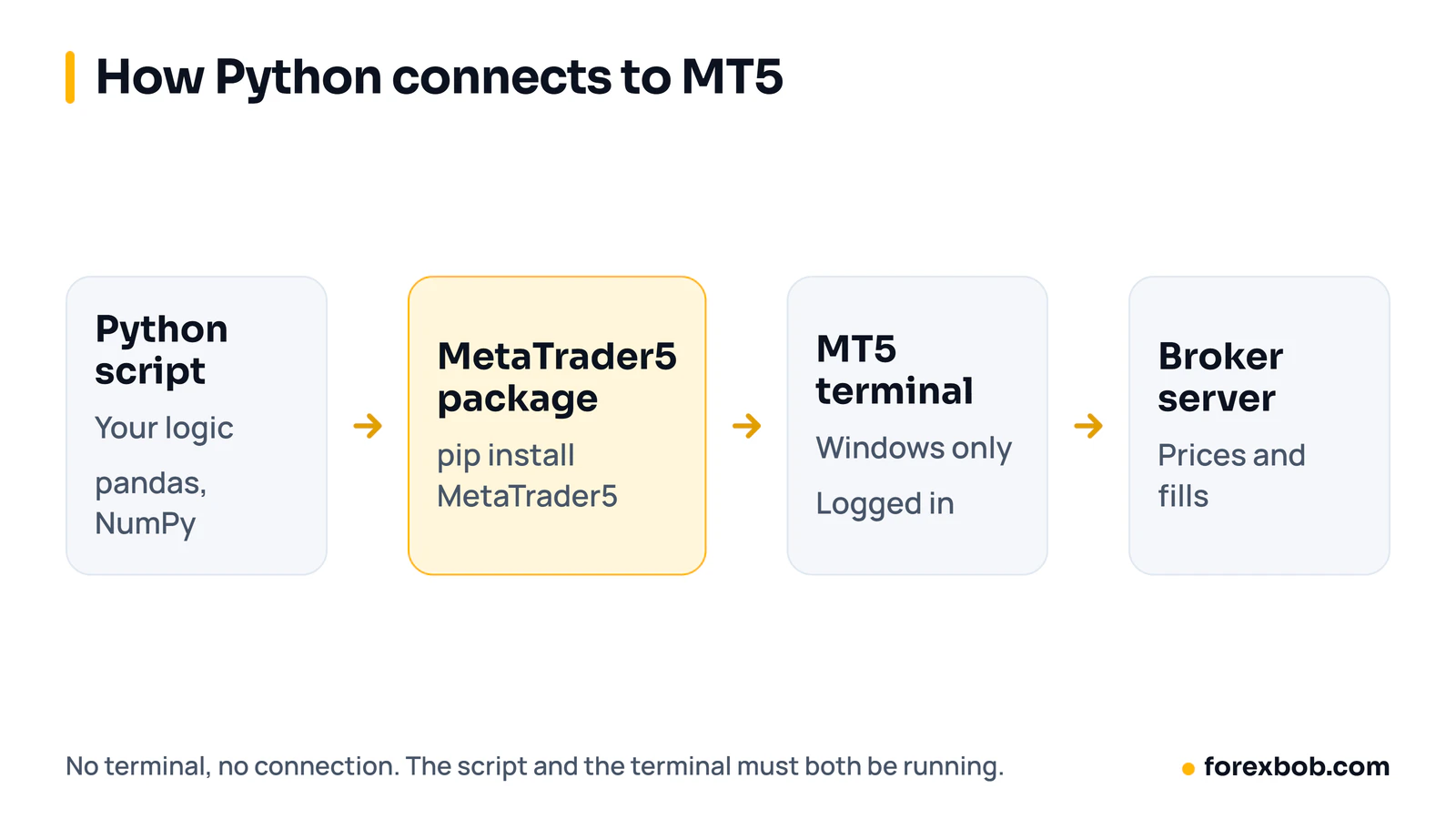
The MetaTrader5 package doesn't talk to your broker directly. It talks to a MetaTrader 5 terminal running on the same computer, and the terminal talks to the broker. That has three consequences:
- It only works on Windows, where the terminal runs.
- The terminal must be installed and logged in to your account.
- If the terminal closes, your script loses its connection.
Setting up
- Install MetaTrader 5 from your broker and log in. A demo account is the right place to start.
- Install the package with pip install MetaTrader5. Pandas is useful too.
- In the terminal, go to Tools, Options, Expert Advisors and allow algorithmic trading if you want the script to place orders.
Connecting and reading the account
Import the package and call mt5.initialize(). If you have more than one terminal installed, pass the path to the right terminal64.exe. It returns True on success. If it returns False, mt5.last_error() tells you why.
mt5.account_info() returns the login, balance, equity, margin and leverage. Check it first, every time. It is easy to point a script at the wrong account when you run several terminals.
Getting price data
mt5.copy_rates_from_pos("EURUSD", mt5.TIMEFRAME_H1, 0, 5000) returns the last 5,000 hourly bars. mt5.copy_rates_range() takes a start and end date instead. Both return a NumPy array with time, open, high, low, close, tick volume, spread and real volume, which drops straight into a pandas DataFrame.
For tick data, mt5.copy_ticks_range() returns every bid and ask change between two dates. Expect a lot of rows: a busy day on gold can be hundreds of thousands of ticks.
If a symbol isn't showing in Market Watch, call mt5.symbol_select("XAUUSD", True) first, or the data calls return nothing.
Two gotchas we hit
Bar times are in broker server time. The time column is Unix seconds, but the clock behind it is your broker's server, not UTC. On a broker at GMT+2 in winter and GMT+3 in summer, a bar stamped 10:00 opened at 08:00 or 07:00 UTC. Convert before you compare with news times or another data source.
You can't ask for more bars than the terminal keeps. Requests beyond the terminal's "Max bars in chart" setting fail. On our terminal that limit was 60,000, and larger requests returned an Invalid params error. Raise the setting in Tools, Options, Charts, or page through with date ranges.
Placing an order
Orders are sent as a dictionary. For a market buy you set the action to mt5.TRADE_ACTION_DEAL, the symbol, the volume in lots, the type mt5.ORDER_TYPE_BUY, the current ask price, a stop loss and take profit, a maximum slippage in points (deviation), a magic number to tag your trades, and a filling mode.
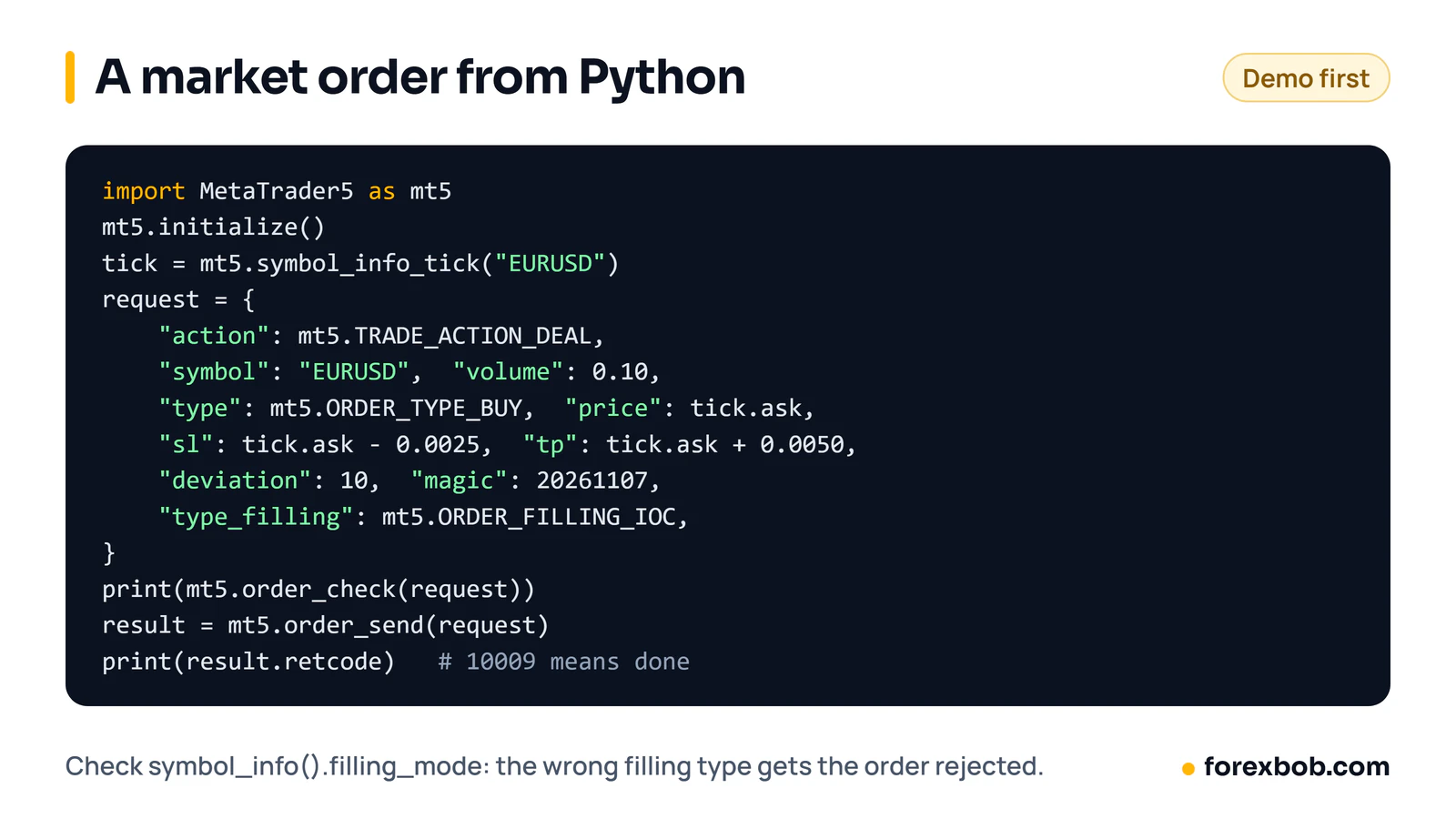
Call mt5.order_check(request) first. It tells you whether the order would be accepted and how much margin it needs, without sending anything. Then mt5.order_send(request) sends it. Check the result's retcode: 10009 (TRADE_RETCODE_DONE) means it went through. Anything else, read the comment.
The filling mode trips up a lot of people. Brokers support different ones, and the wrong one gets the order rejected. mt5.symbol_info(symbol).filling_mode tells you which are allowed.
mt5.positions_get() lists open positions and mt5.history_deals_get() returns closed deals between two dates, which is handy for building your own trade journal.
What we use it for
Most of our Python work is research. When we looked at building a hedging EA from negatively correlated pairs, we pulled 4,000 hourly bars for 28 currency pairs straight from the terminal and measured every correlation. The strongest pairs, such as EUR/USD and USD/CHF at −0.77, turned out to be the same currency on opposite sides. Long both is just a more expensive way to trade EUR/CHF. That took an afternoon in Python and saved building an EA on a bad idea.
Python or MQL5?
- Backtesting: the MT5 Strategy Tester only runs MQL5 code. A Python strategy has to be backtested in Python, with your own code for fills, spreads and costs. That is easy to get wrong.
- Speed: Python polls the terminal. That is fine for strategies on M5 bars and up. For tick-level reaction, an EA running inside the terminal is faster.
- Running 24/5: a Python script needs the terminal and the script both running, usually on a Windows VPS. An EA needs only the terminal.
- Research and machine learning: Python wins easily, with pandas, NumPy, scikit-learn and the rest.
A common setup is to do the research in Python, then write the final rules as an MQL5 Expert Advisor so they can be tested in the Strategy Tester and run without a separate script. If you have rules ready and want them built, see our EA development service.
Keep reading: what an Expert Advisor is, the MT5 Strategy Tester guide, turning a strategy into an EA and MT4 vs MT5.
Risk note: trading forex carries a high level of risk and may not be suitable for everyone. This article is for education only and is not financial advice.
Have a strategy you want automated?
We turn trading rules into tested Expert Advisors for MT4 and MT5. Tell us how you trade and we'll send a specification and a quote.
More articles

Supply and demand trading: how to mark zones, and what testing shows
How to find supply and demand zones, draw them, enter and place stops. Then what happened when we tested a zone strategy on seven years of EUR/USD.
Read article
Forex risk management: the complete guide
Everything that decides how much you can lose, in one place: risk per trade, sizing, stops, leverage, correlated trades, drawdown limits and the extra risks of EAs.
Read article
Forex prop firms explained: funded accounts, the rules and using EAs
What prop trading is, how forex funded account challenges work, the drawdown rules that end most attempts, what firms allow with EAs, and the maths behind passing.
Read article